 DocumentLane
Working on a client's page
Track progress, send reminders and adjust one client's requirements.
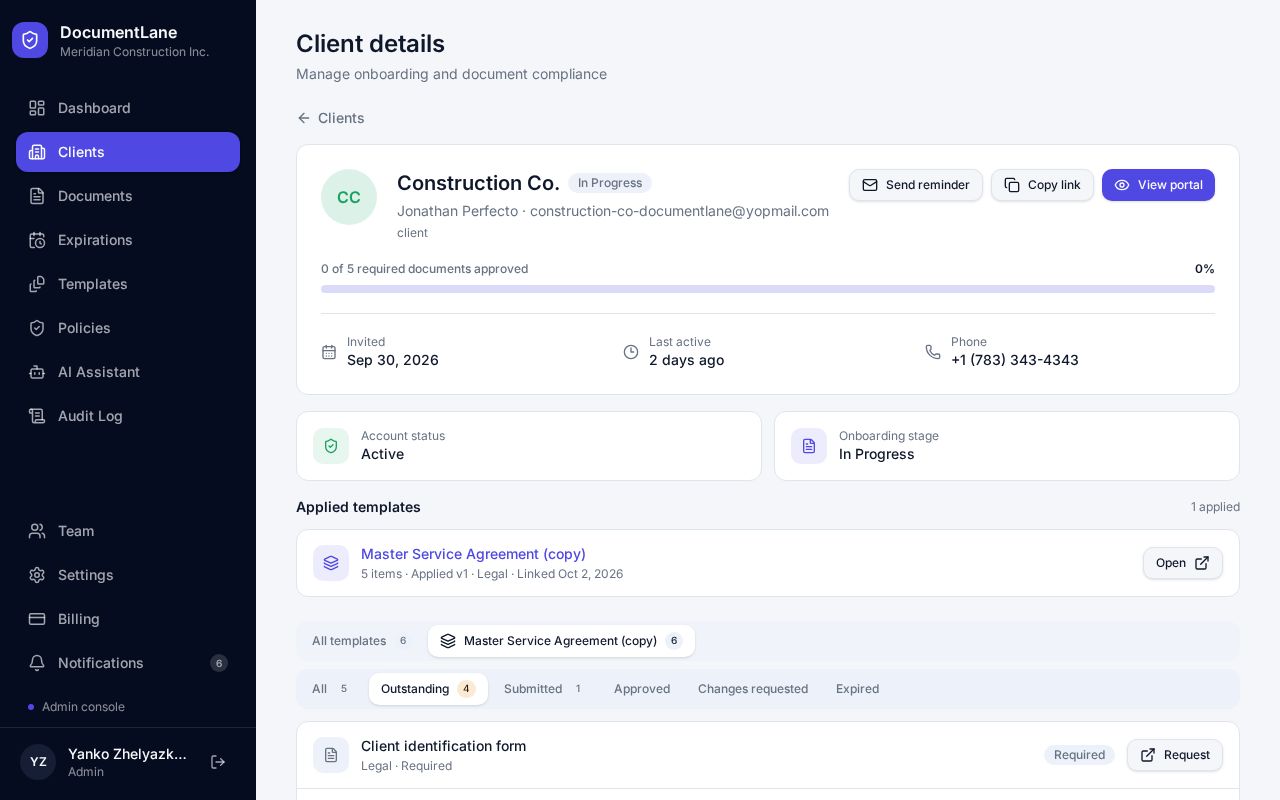
What's on the page
- Progress bar: how many required documents are approved.
- Send reminder: emails the client a list of what's still missing.
- Copy link and View portal: share or open the client's private upload page.
- Applied templates: the checklists given to this client, with the version they received.
- Requirement tabs: filter by Outstanding, Submitted, Approved, Changes requested or Expired.
Status labels
- Invited: the portal link has been sent but not opened yet.
- Active: the client has opened their portal.
- In Progress: at least one document is uploaded, or something was rejected or expired.
- Awaiting Review: everything required has been submitted.
- Complete: everything required is approved.
Changing one client's requirements
Requirements are saved per client, so you can add, remove or mark items optional for one client without changing the template everyone else uses.
Still stuck? Email hello@documentlane.ai.